Network and Security
All infrastructure elements interact with each other within a private virtual or local network. The address range of this network is set by the VPC CIDR parameter, for example 10.0.10.0/24. Incoming traffic to this network is restricted by infrastructure rules, and outgoing traffic is subject to the rules of the provider from which you rent servers. The diagram shows the general structure of such a network for the typical case of renting virtual servers from a provider.
Private VPC Layout
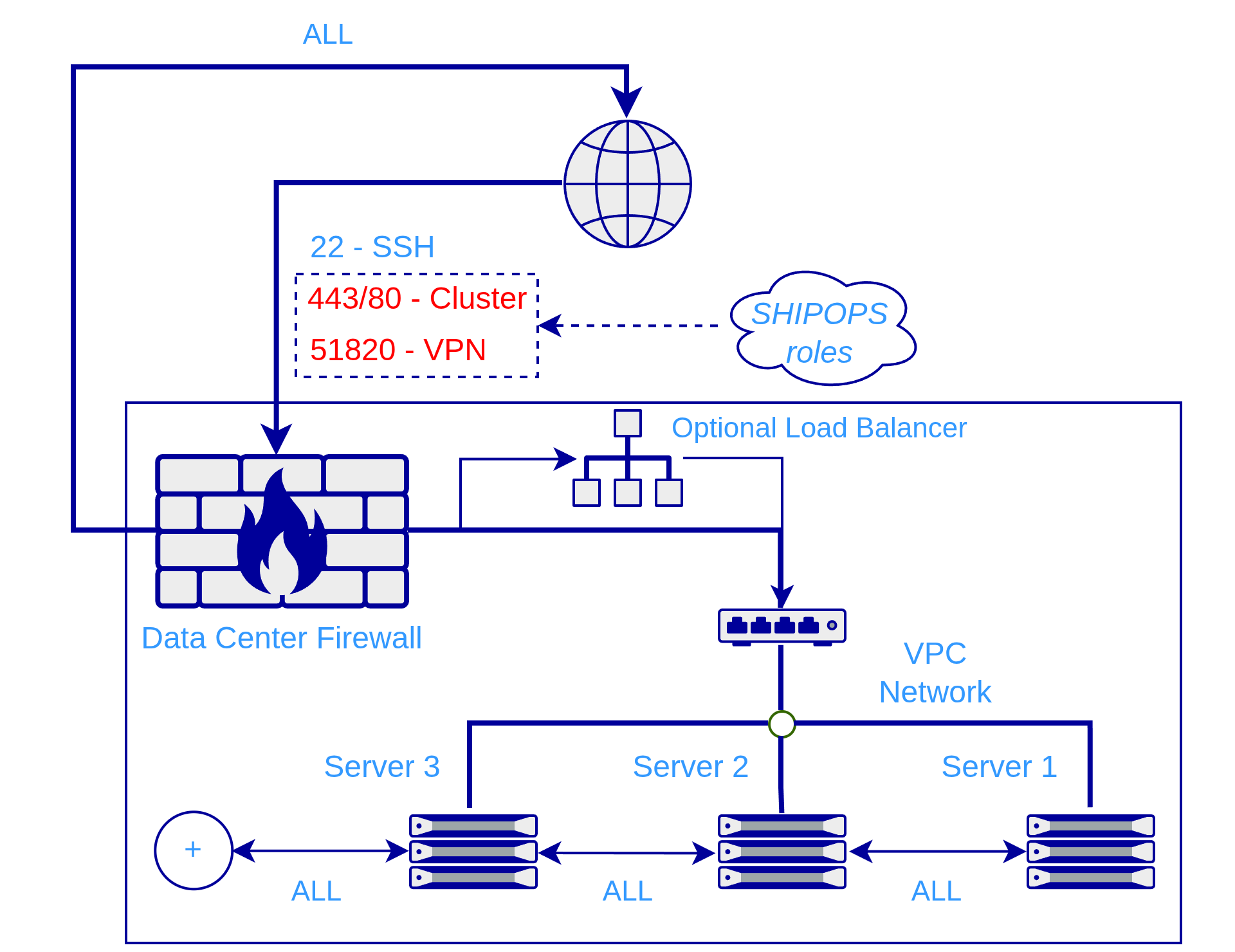
SHIPOPS does not create this network; it uses an already prepared network to which each Server used for roles inside this VPC is connected. The user can find out the CIDR of the private network, and even set it, when renting a virtual server from a cloud provider (see Creating a Private Network) or when creating servers independently. SHIPOPS does not protect this private network: by definition, the provider must do that. For its part, SHIPOPS guarantees that it will use this network interface to configure the role software installed on servers and check that the values in the VPC IP address field match.
The second element of VPC configuration is the local root domain. It is used primarily as the root domain of all clusters created in this VPC, and also as the root domain for the DNS Server role, if it is used. This approach lets infrastructure elements be connected at the domain-name level. If any of the clusters is public, the domain by which this cluster will be available from outside should be specified in the routing settings, overriding the automatically generated local domain (see Routing Services in a Cluster).
Access from Outside the VPC
You can access clusters by local domain names if you install the VPN Server role.